Logging in notes
Sep 22 · Chest day
Bench 80×8, 80×8, 77.5×7
Incline 67.5×10, 67.5×9, 67.5×8
Fly 17.5×12, 17.5×12, 17.5×10
18 entries
Three exercises, three sets each: 18 numbers to type — after scrolling back to find last time’s.
Train Hard. Track Light. Win Deep.
CoreWeight — Training log for strength, body weight and progress photos.
Your log is your edge.
Strength, cardio, body weight and progress photos in one app. Repeat your last session in as few as two taps, watch your numbers climb in charts and personal bests, and let Apple Intelligence review your last 30 days.


The problem
Logging in notes or a spreadsheet starts with hunting down last time’s weights and typing every set again. CoreWeight lays out last session’s sets for you.
Logging in notes
Sep 22 · Chest day
Bench 80×8, 80×8, 77.5×7
Incline 67.5×10, 67.5×9, 67.5×8
Fly 17.5×12, 17.5×12, 17.5×10
18 entries
Three exercises, three sets each: 18 numbers to type — after scrolling back to find last time’s.
With Routine in CoreWeight
As few as 2 taps
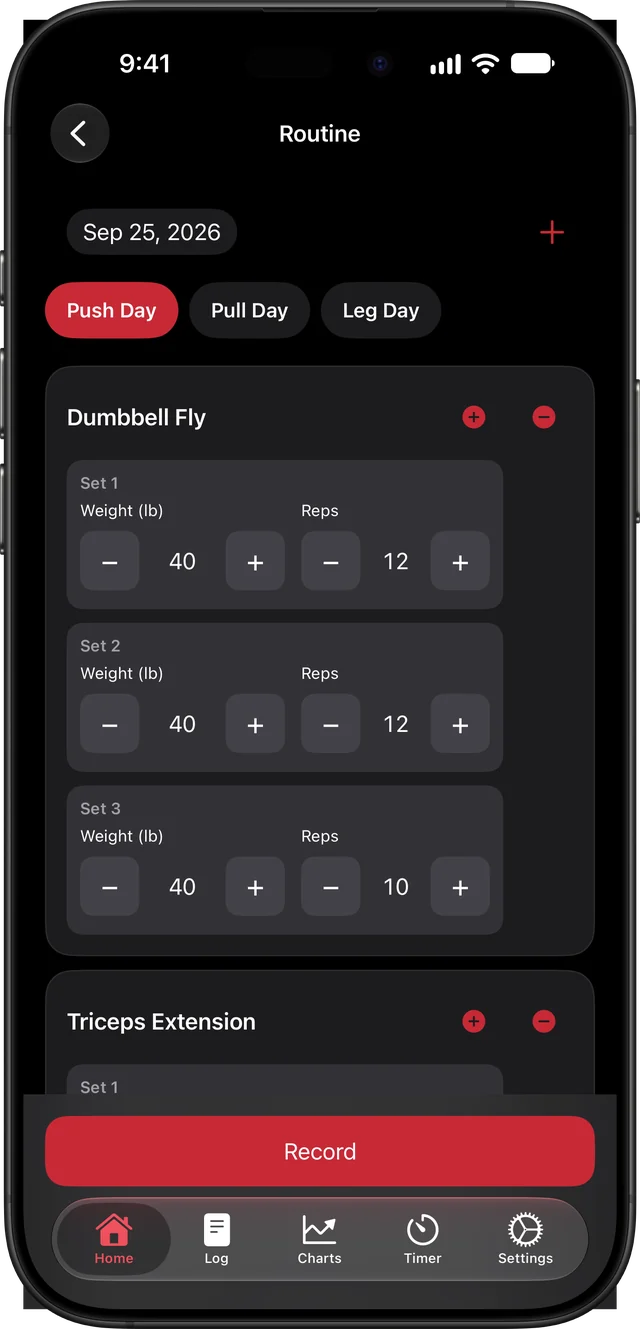
Last session’s exercises, sets, weights and reps are already filled in. Change what’s different, then Record → Save.
What it does
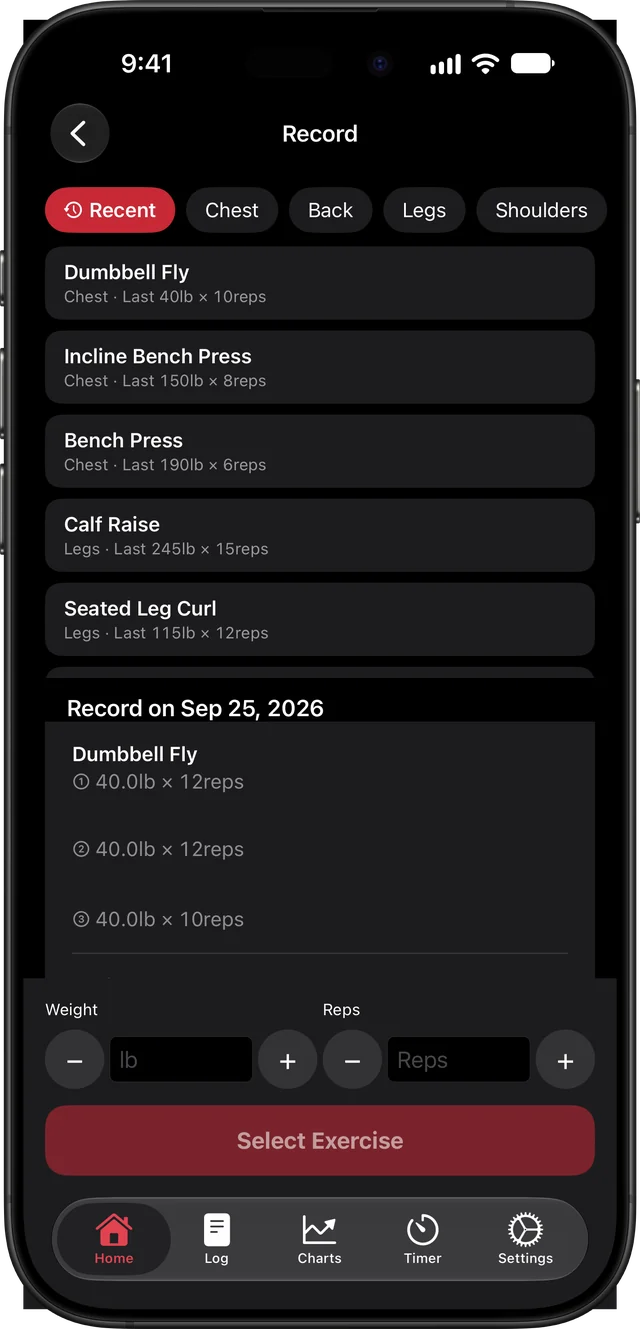
Three ways in: Record, Menu and Routine. Routine fills in last session’s exercises, sets, weights and reps, so logging takes as few as two taps.
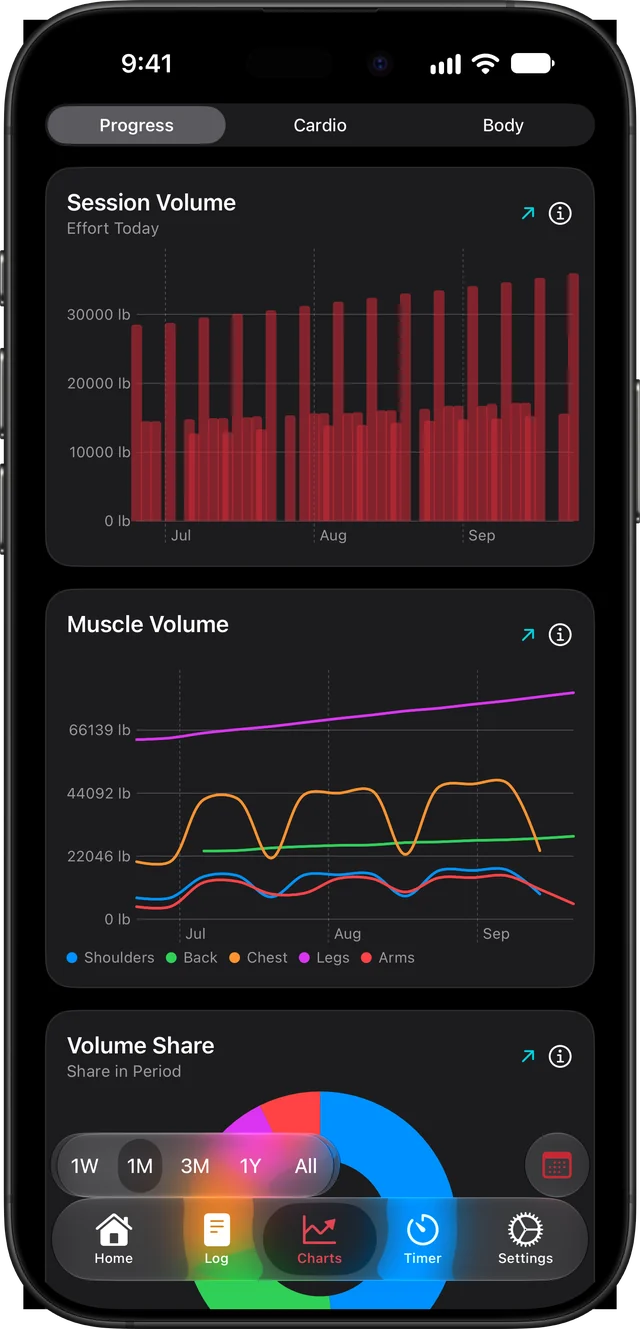
Volume, muscle-group share, estimated 1RM trends, body weight and body fat. Personal bests are collected for you, and photos can be compared side by side or overlaid.
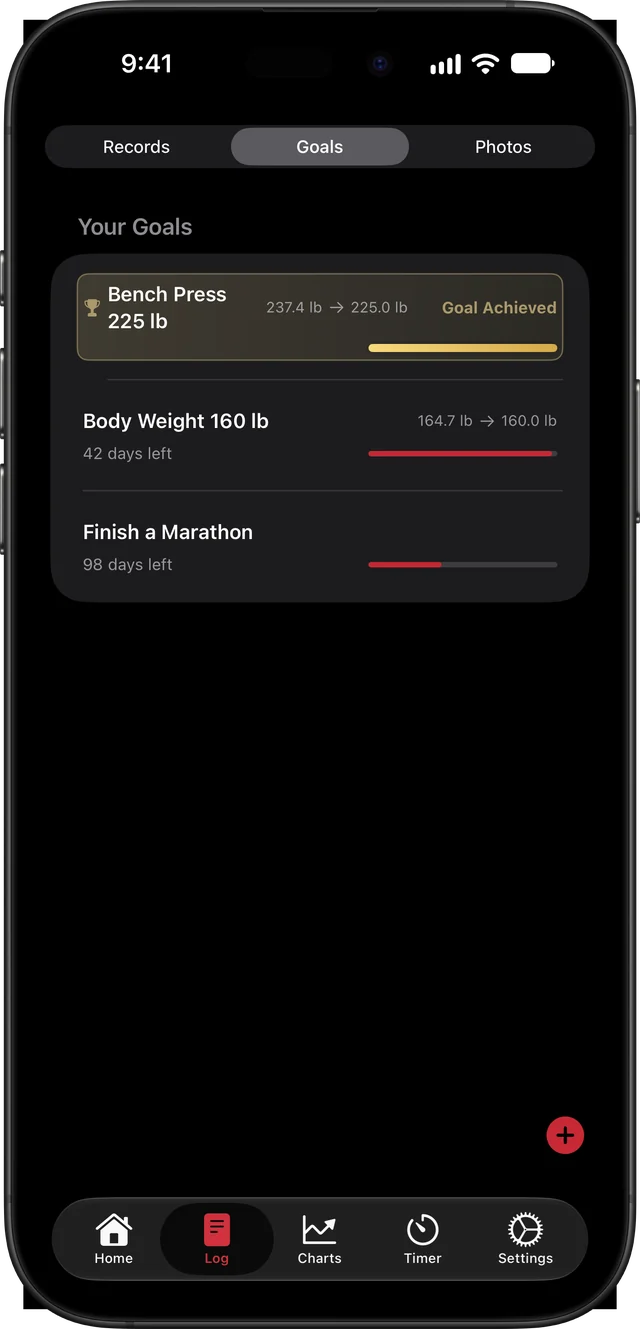
See how far you are from your goals, and how many days are left, on Home and in widgets. Apple Intelligence reviews your last 30 days and suggests what to do next.
Fast logging
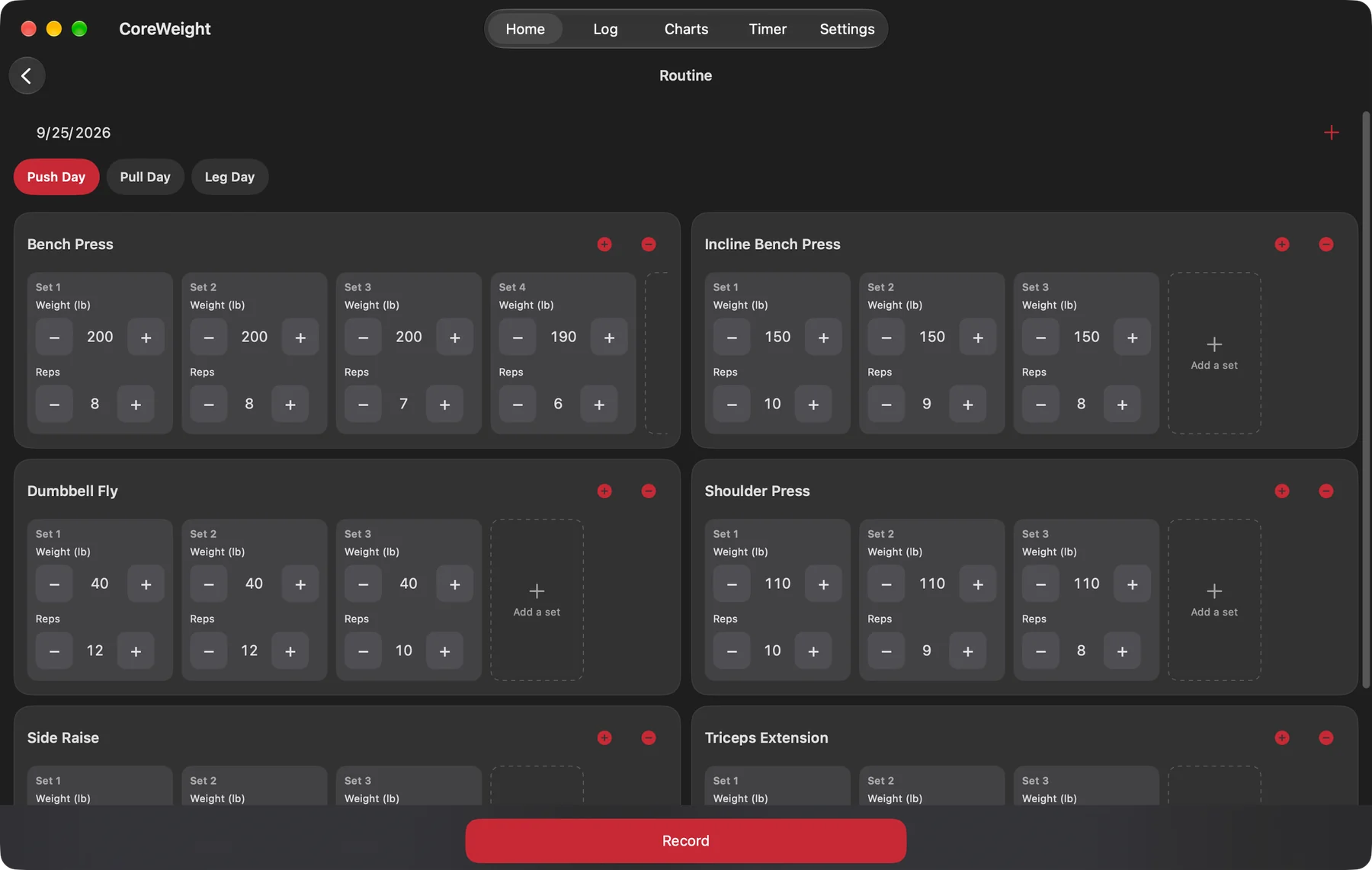
Pick a menu in Routine and every exercise appears with last session’s sets, weights and reps. Change what’s different, tap Record, then Save.
Log a single exercise, found by muscle group. On iPad and Mac, your recent sessions for it stay in view while you enter sets.
Log from your saved menus, such as a push day or a leg day.
Enter every exercise in a menu, set by set, all at once. On iPad and Mac, sets line up side by side.
Import past workouts from a CSV file, whether they come from a spreadsheet or another app.
Charts & PRs
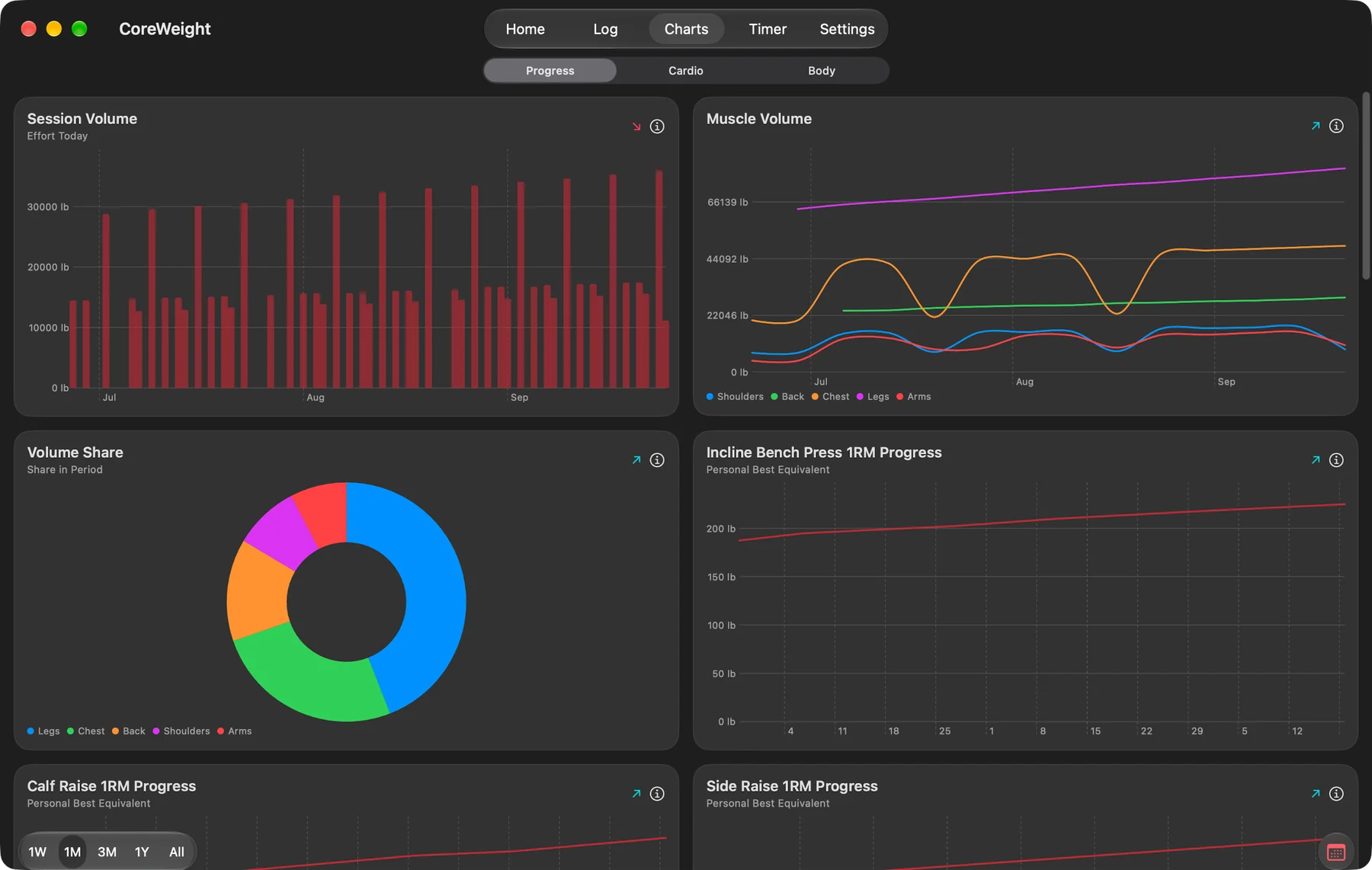
Session volume, volume and share by muscle group, and estimated 1RM trends for each exercise. View a week, all time, or any dates you choose.
Your best set for each exercise, ranked by estimated 1RM. You’re told the moment you set a new one, and you can share it as an image.
Trends with your goal line. Body measurements and anything you track with your own name and unit get charts too.
Heart-rate zones, VO₂ max, running distance and more, from your Apple Health workouts.
Progress photos
Save photos by pose — 14 of them, from Front Double Biceps on — or in your own groups. Compare two side by side, or overlay them and fade between them.
Save the side-by-side or overlaid result as an image.
Export a video that slowly fades from one photo to the other.
Apple Intelligence
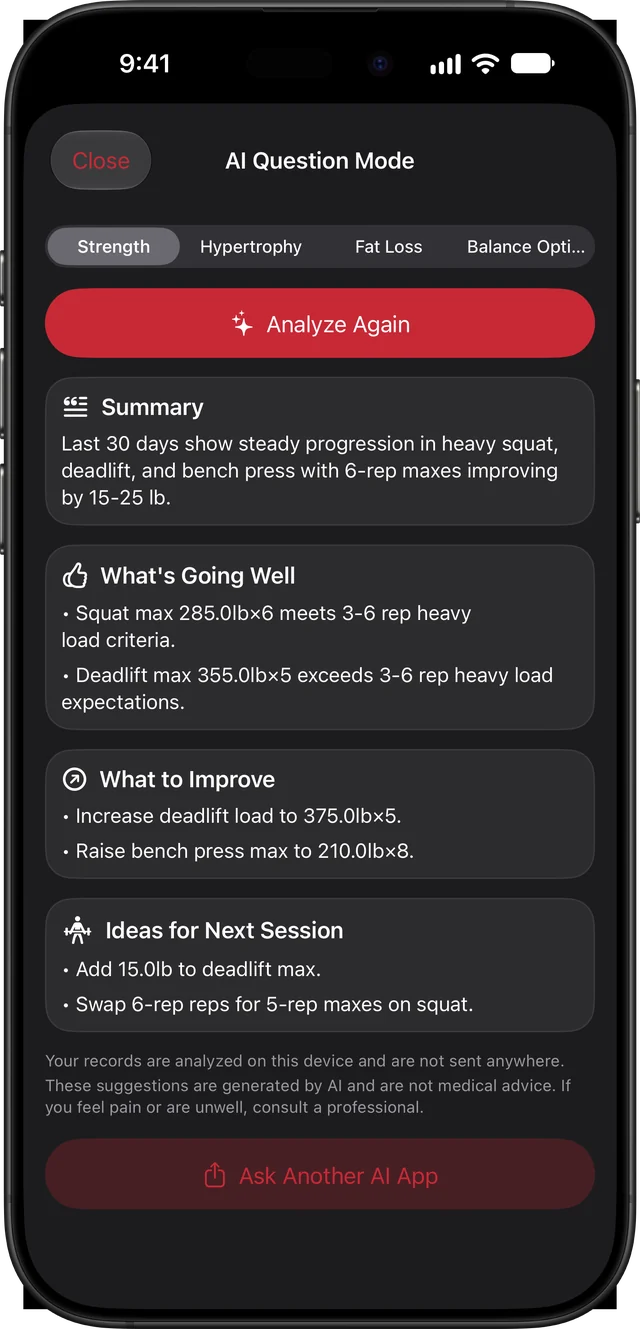
On supported devices, Apple Intelligence analyzes your last 30 days on the device itself and sums them up: an overview, what’s working, what to improve, and what to try next.
The analysis runs on your device, and your log is never sent anywhere.
Choose strength, hypertrophy, fat loss or balance, and CoreWeight writes a question with your log attached. Copy it into ChatGPT or any AI you like.
Everywhere you train
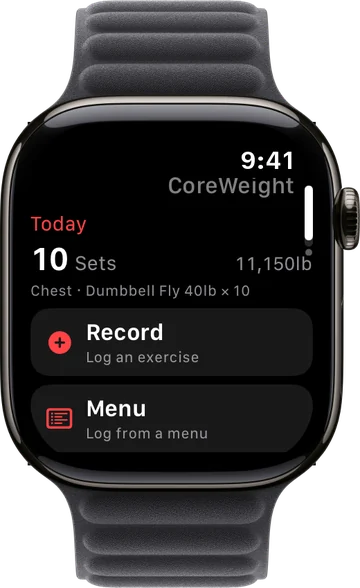
Log sets from your wrist. If your iPhone isn’t nearby, they’re delivered later. Includes a HIIT/Tabata timer and watch-face complications.
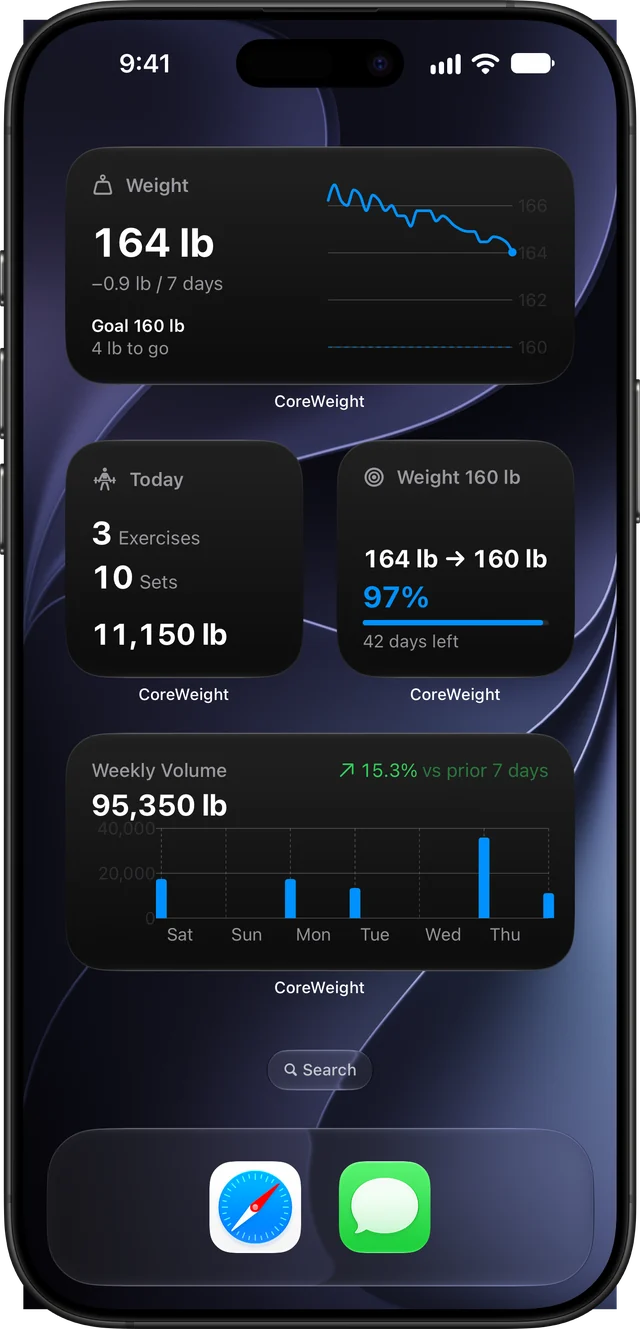
Today’s training, body weight trend, a goal, and weekly volume — on your Home Screen and Lock Screen.
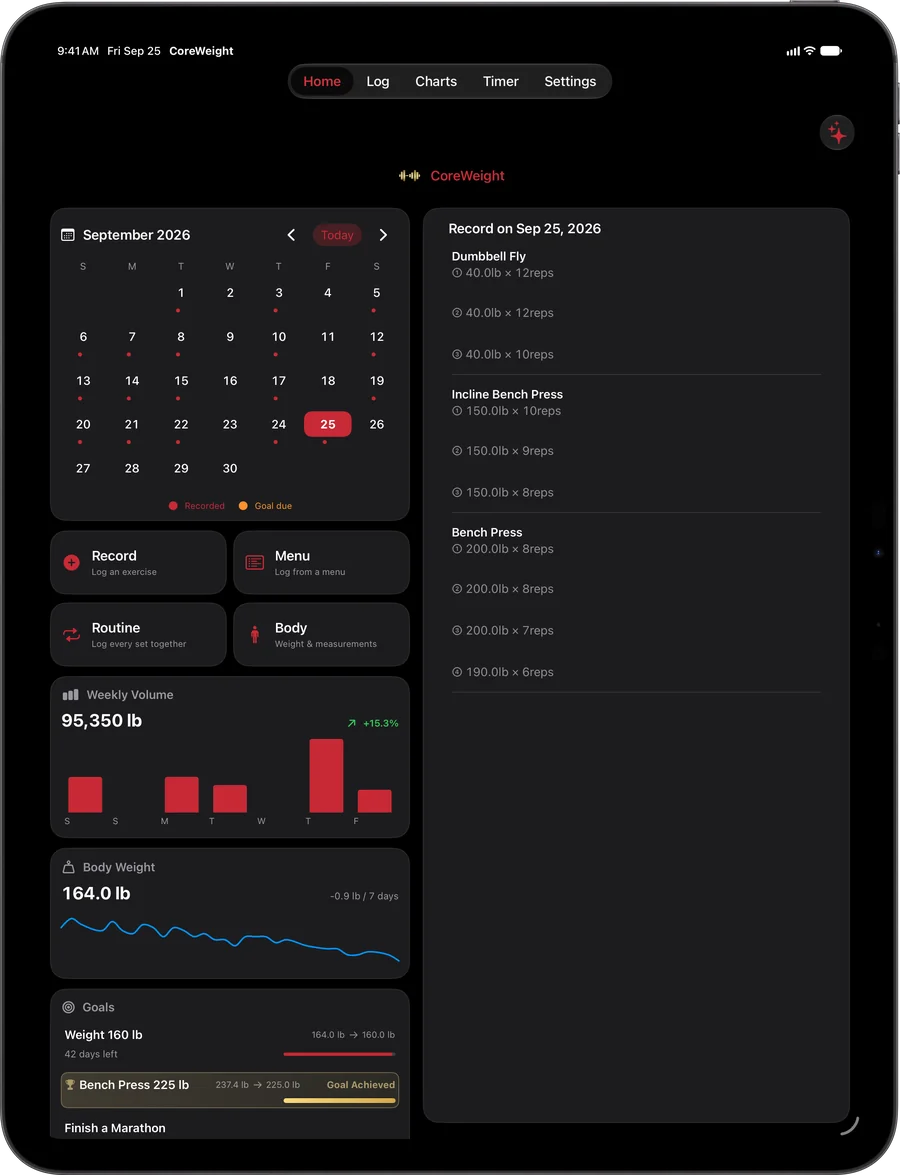
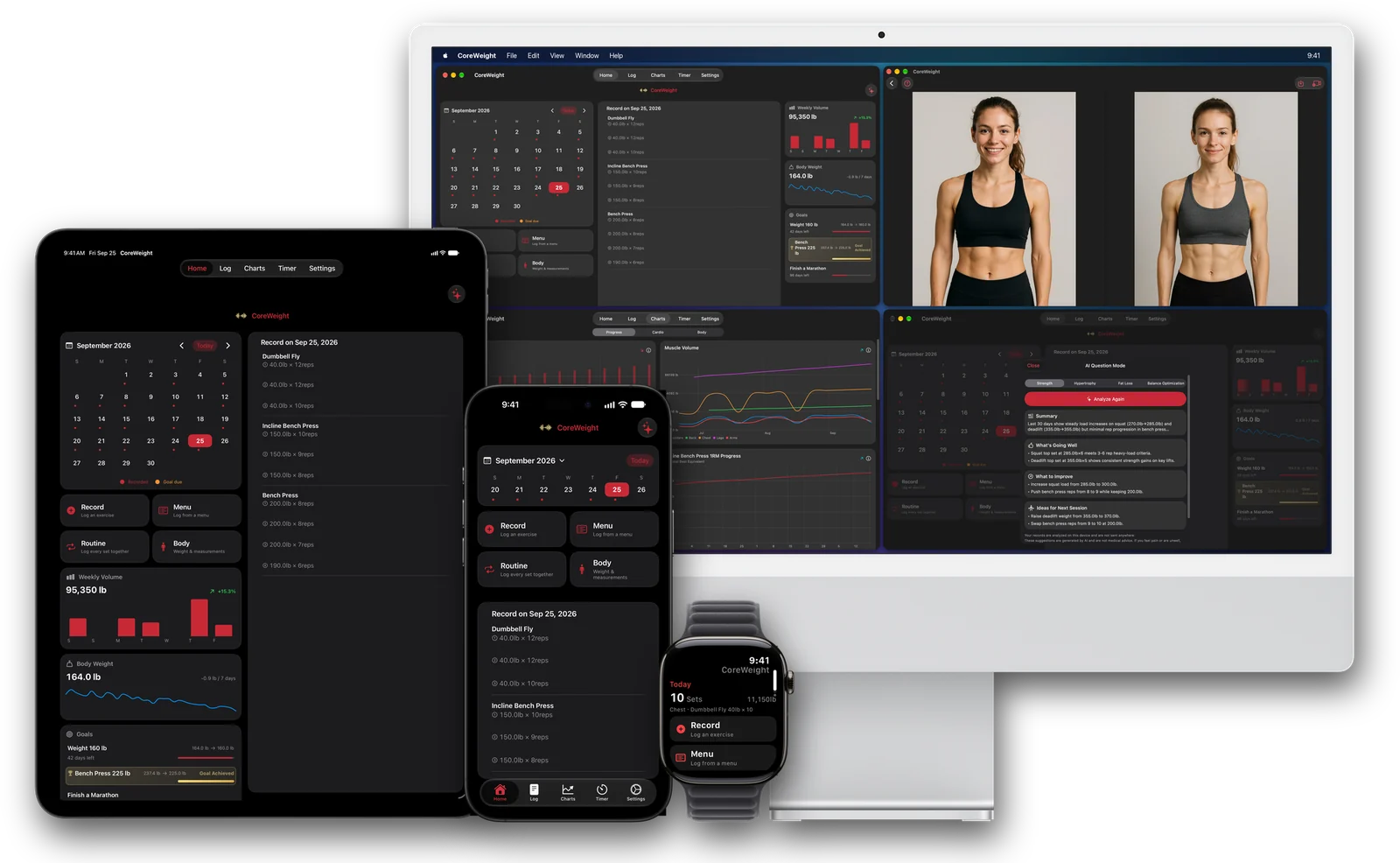
Wide screens show a large calendar, the day’s sets and your weekly summary side by side. Everything syncs through iCloud.
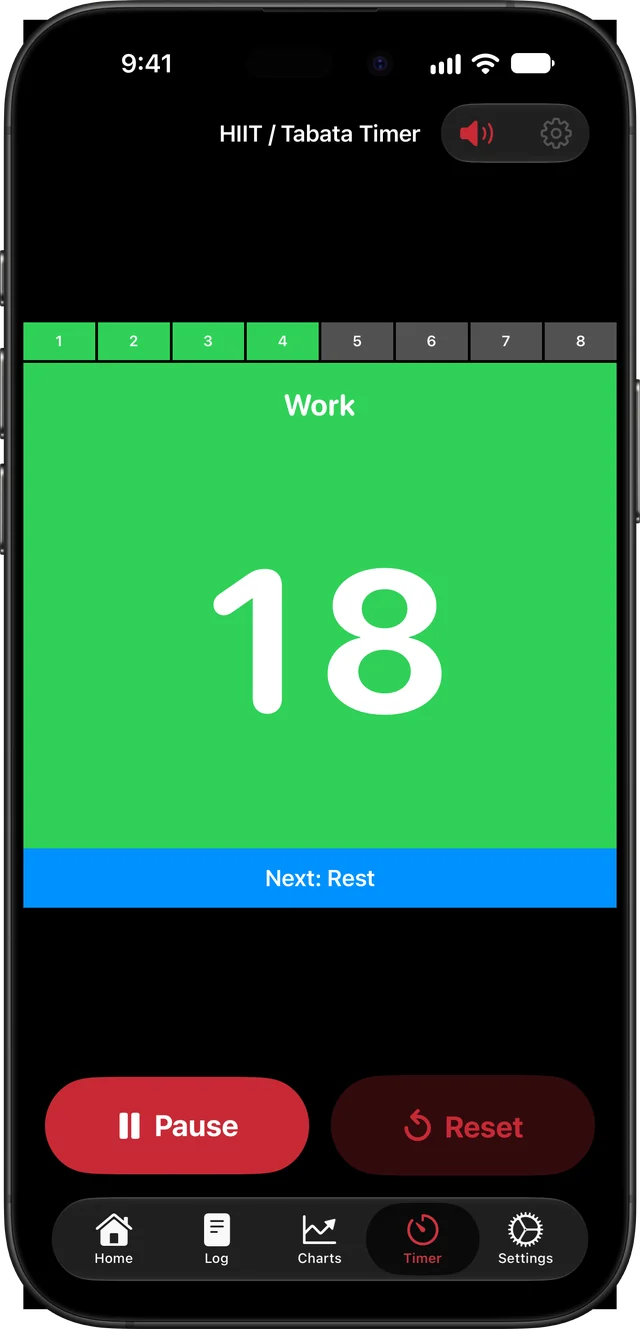
A HIIT and Tabata timer. Set prep, work and rest times and the number of rounds, or start Tabata in one tap.
Privacy
Your log is stored on your device and synced through your own iCloud. Nothing is sent to Vision Structure’s servers. Ads in the free version are not personalized.
Availability
iPhone · iPad
Logging, charts, photo comparison, goals, widgets and AI. The only ad is a banner on the Home screen.
A one-time purchase removes the ad. No subscription. See the purchase screen for your local price.
Mac
The same log as your iPhone and iPad, synced through iCloud. Spread out charts and photos across a big screen and multiple windows.
Apple Watch
Install CoreWeight on your iPhone to use it on Apple Watch. Your sets are sent to your iPhone.
For iPhone, iPad, Mac and Apple Watch. Available in English, Japanese, German and Traditional Chinese.
FAQ
Yes. CoreWeight has an Apple Watch app, so you can log weight and reps from your wrist right after a set (entered with the Digital Crown). You can also see today’s sets and total volume on your wrist. If your iPhone isn’t nearby, your sets are delivered to it later. It also includes a HIIT/Tabata timer and watch-face complications. To use the Apple Watch app, install CoreWeight on your iPhone.
Yes. Pick a menu in Routine and every exercise appears with last session’s sets, weights and reps already filled in. Change what’s different, tap Record, then Save, so logging takes as few as two taps. Besides Routine, there are two more ways in: Record, for logging one exercise at a time, and Menu, for logging from your saved menus.
Every logging feature is free. The free iPhone and iPad version shows a banner ad on the Home screen (ads are not personalized). A one-time purchase removes the ad, and there is no subscription. The Mac app has no ads. See the purchase screen for your local price.
Yes. Your log on iPhone, iPad and Mac syncs through your own iCloud. Nothing is sent to Vision Structure’s servers. Sets you log on Apple Watch are sent to your iPhone.
CoreWeight works on iPhone and iPad (iOS/iPadOS 18 or later), Mac, and Apple Watch (watchOS 11.4 or later). The Apple Watch app requires an iPhone. The Apple Intelligence review of your last 30 days requires iOS 26 or later and a supported device, language and settings with Apple Intelligence available. The app is available in English, Japanese, German and Traditional Chinese.
Yes. Charts cover total volume, volume and share by muscle group, and estimated 1RM trends for each exercise, for a week, all time, or any dates you choose (estimated 1RM uses the Epley formula and is a guide only). Personal bests are collected for you automatically, with your best set for each exercise ranked by estimated 1RM, and you’re told the moment you set a new one. Photos can be saved by pose or in your own groups, and compared side by side or overlaid with adjustable fade. Body weight and body fat trends are charted too.
CoreWeight is an all-in-one workout log, from Apple Watch to Mac. Your last routine (exercises, sets, weight, reps) is already filled in, so you can log in as few as 2 taps. Charts, personal bests, photo comparison and goals are in the same app.
In CoreWeight, the exercise list shows last time's weight and reps, such as "Last 60kg × 8reps," and the input fields start with last time's first set (or, if you have already logged that exercise today, today's last set) already filled in. When you log with a Routine, the sets from the last day you did it are filled in from the start, with weight and reps. On Apple Watch, the input screen also lists last time's sets.
CoreWeight is a free app, and logging, charts, photo comparison, goals, widgets and the rest have no feature limits. Ads appear as a banner at the bottom of the app's Home tab, on iPhone and iPad only. Mac has no ads. The ads are not personalized. There is one one-time purchase, and it removes ads. There is no subscription. The price is shown on the purchase screen.
With CoreWeight's Apple Watch app, you can enter weight and reps on your wrist right after a set, using the Digital Crown. You can also see today's set count and total volume on your wrist, and there are HIIT and Tabata timers. Apple Watch use requires an iPhone (watchOS 11.4 or later).
CoreWeight also works on Mac, and your records sync through your own iCloud. On Mac you can review your history on a large calendar with a weekly summary, open charts in a separate window, and compare photos on a bigger screen. There are no ads on Mac.
CoreWeight can import past records from a CSV file. It reads a CSV prepared in a "date, exercise, weight, reps" format. It imports only; it cannot export CSV. A CSV from another app may not load as it is. If an exercise name differs, you can assign it to an existing exercise or create a new one.
CoreWeight's charts show total session volume, volume and share by body part, estimated 1RM progress by exercise, and weight, body fat and body size trends. Estimated 1RM is a rough guide based on the Epley formula. Personal bests are listed automatically, and a celebration screen appears when you set a new one.
Facts